Most data centers have different classes of storage media such as SATA disks, SAS disks and SSDs/Flash. Each class can have many different subcategories, especially SSDs/Flash, and they all differ in terms of access speed, capacity, and price. You want your most frequently accessed data to stay on the fastest storage media, but the fastest media is also the rarest because it is expensive.
What is Auto-Tiering
Auto-tiering allows you to store, and subsequently read, your data on the storage media with the best fit based on predefined rules, or policies. This approach to tiered storage data classes automatically finds which data sets are most accessed by your applications (your hot data) and places it on the fastest storage. The same is true for your warm and cold data – it is automatically placed on second-tier or lower-tier storage. All of this happens dynamically in real time yet is invisible in the background. Depending on your data usage, the classification may rank up or down automatically, allowing you to have the best speeds for your mission- and business-critical information. Explore the features below to see how you can maximize application speed across your entire organization and tailor your storage infrastructure to your business needs.

Tiering vs Caching: What’s the Difference
At first glance, tiering and caching solutions may look similar but there are fundamental differences in the utilization of faster storage and the underlying technology leveraged to identify and speed up your most frequently accessed data.
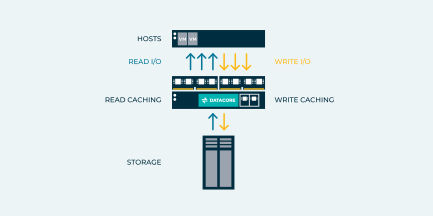
High-Speed Caching is a proprietary caching algorithm that accelerates I/O by leveraging RAM as a read and write cache. DataCore supports up to 8 TBs of high-speed cache per node, creating a true “mega-cache” to turbocharge application performance.
RAM is a commodity component and therefore relatively inexpensive, yet it possesses outstanding performance characteristics and lacks the shortcomings that are attributed to Flash devices. RAM is an excellent technology to leverage for accelerating I/O performance and delivers a very high benefit-to-cost ratio across the entire storage architecture.
High-Speed Caching is critical for maintaining application performance because RAM is many orders of magnitude faster than the fastest Flash technologies and it resides as close to the CPU as possible. It is the fastest storage component in the architecture, delivering a 3-5x performance boost to applications and freeing up application servers to perform other tasks. It also extends the life of traditional storage components by minimizing the stress experienced from disk thrashing.
Application workloads are hard to predict. Auto-Tiering is a real-time intelligent mechanism that continuously positions data on the appropriate class of storage based on how frequently the data is accessed. The result is superior application performance and lower TCO across the entire storage architecture.
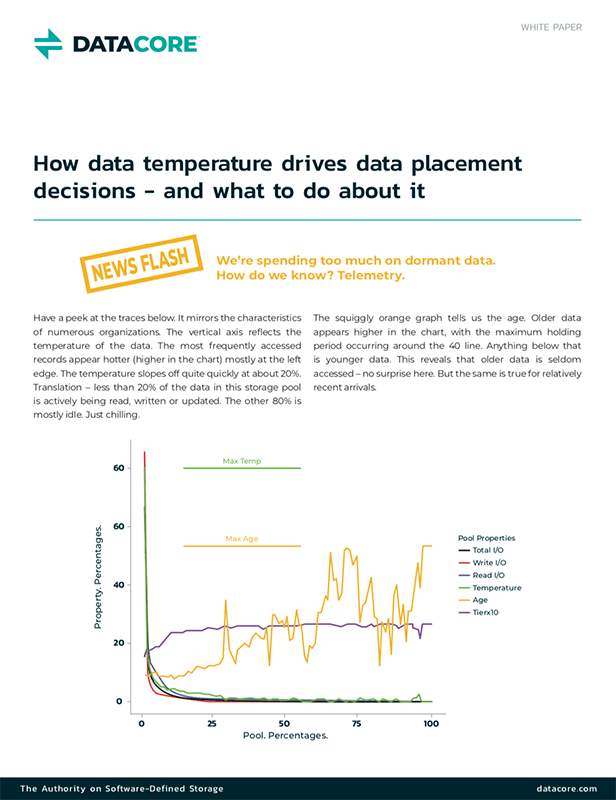
Tiered storage avoids the need to invest heavily in expensive Flash technology. Industry statistics show that, on average, only 15-20% of a company’s entire data footprint benefits from Flash storage since the remaining percentage is considered largely dormant.
According to Gartner, “The access patterns, value and usage characteristics of data stored within storage arrays varies widely, and is dependent on business cycles and organizational work processes. Because of this large variability, data stored within storage devices cannot be economically and efficiently stored on the same storage type, tier, format or media.”
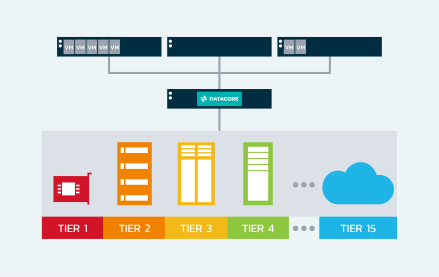
Auto-Tiering leverages any combination of Flash and traditional disk technologies, whether it is internal or array based, with support up to 15 different storage tiers. For example:
| Tier | Details | % OF TOTAL PRODUCTION |
| 1 | Ultra-High-Speed Disk (Flash) | 15% |
| 2 | High Speed Disk (SAS 15k) | 25% |
| 3 | Capacity Disk (SAS 7.2k NL) | 60% |
| 4 | Test/Dev Disk (SATA) | As Needed |
| 5 | Archival Cloud Disk | As Needed |
As more advanced disk technologies become available, existing storage tiers can be modified as necessary and additional ones can be added to further diversify the tiered storage architecture.
Key Benefits of Auto-Tiering
- Dynamic Data Analysis: Real-time data access pattern monitoring for optimal tier placement
- Seamless Migration: Non-disruptive and automated movement between storage tiers
- Cross-Device Consistency: Uniform auto-tiering functionality across various vendor devices
- Efficient Space Utilization: Maximized storage capacity through optimal data placement
- Fully Automated: Configure and let automation do the rest; no manual intervention needed
Adaptive Data Placement: Expanding on the Goodness of Auto-Tiering
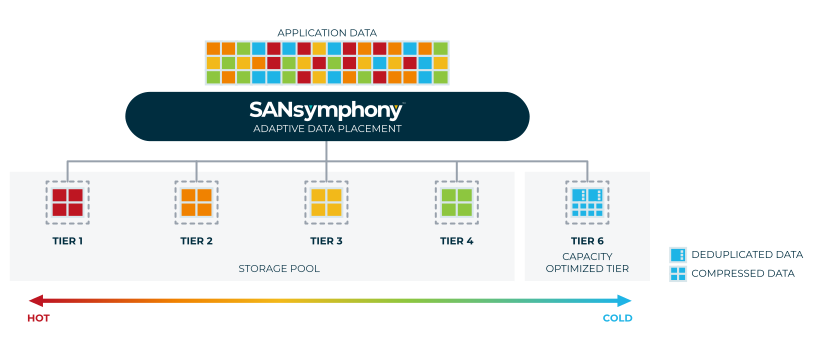
In the realm of block storage, capacity optimization is a key requirement to reduce the storage footprint by compressing data and by eliminating redundant data segments. SANsymphony introduces Adaptive Data Placement that expands the auto-tiering capability to work in tandem with inline deduplication and compression.
SANsymphony analyzes data access temperatures continuously, pinpointing which datasets are relatively cold and prime candidates for compression and deduplication. Once identified, these datasets are then capacity-optimized.
Then, SANsymphony dynamically tracks data access patterns, employing auto-tiering to ensure datasets are always placed on the most appropriate storage tiers, thereby optimizing both performance and capacity in real time—which is a unique capability in a storage solution.
The result? You achieve:
- The best possible performance for hot data
- The lowest possible footprint for cold data